Showing posts with label e-amusement. Show all posts

Thursday, May 19, 2016

5/19 - Disney Tsum Tsum has rolled into Round 1 San Jose!

By Ann Nakamura

Last year, Round 1 had a location test of Disney Tsum Tsum at their Puente Hills location. Now, we bring you Disney Tsum Tsum again, but it’s here to stay! The long awaited mobile-turned-arcade game has entered Round 1 Eastridge and its starting to create huge crowds and gather a lot of fans!


If you have played Disney Tsum Tsum on your mobile phone, the premise is absolutely the same: connect the same like Tsum Tsum on screen, create chains, and attempt to get the highest score and become a Tsum Master! The game is completely localized for the American audience, meaning the menus are easy and comprehensible! But what makes this game so great? To the human eye, it’s just Tsum Tsum with a bigger screen. However, the game offers more than that! An optional feature of Tsum Tsum is the ability to purchase different keychains that will unlock in-game abilities! For $6, you can obtain a physical Tsum Tsum keychain that contains a random Disney character (Donald, Pluto, Mickey, Minnie, etc) and you can obtain up to four keychains per game! These keychains are absolutely adorable, but don’t let their looks fool you! Since the Tsum Tsum arcade game was published by Konami, it utilizes the e-Amusement server, meaning players can register their e-Amusement cards for this game to unlock power-ups, earn coins, record high scores, but most of all register the keychain you just got! Each keychain has its own unique ability (like in the game) and by registering the keychains to the card, you can use that character in game!

IMG_20160509_183623529.jpg


Is there anything different though than just keychains and big screens? One other new feature of Disney Tsum Tsum is dual-wielding Tsum's abilities. Instead of having one Tsum Tsum chosen as your main character (like in the mobile game), players can pick two Tsum Tsum’s for ability use. This means that you fill up your Tsum meter and then use their abilities, but instead of only being able to use one, you get two! This makes gameplay much more interesting as you will find yourself strategizing as to when to use certain Tsum’s abilities. And if that isn’t a curveball, there are also two other modes besides the classic Tsum Tsum that players can try out!


IMG_20160509_183041503.jpg
Ramil Tadeo demonstrates the gameplay for Disney Tsum Tsum


“This game is a money pit.” says Ramil Tadeo, an avid Tsum Tsum fan. “I’ve spent 12 swipes ($18) in 10 minutes!” When we asked him to talk about his experience with the arcade game in comparison to the mobile version, he said, “Comparing to the iOS version in particular, the screen is definitely bigger where I find my eyes moving around a lot. Also, one of the big differences between both games is you get two ability Tsums”.


Hopefully, this game will be able to bring Tsum Tsum fans from all across the Bay Area together, and will give fans new things to collect!

Friday, April 8, 2016

4/7 - Let's Talk GITADORA!

By Ann Nakamura

At the Arcade Hub, we’ve gone over many music games such as MUSECA, Sound Voltex and Crossbeats. However, there is one particular game we have not covered, and it’s because we wanted to save the best (in my opinion) for last! GITADORA is currently a Round 1 exclusive and we talked to David Aerts and Simm Broome for their insights!

GITADORA Tri-Boost is the most recent iteration of the GITADORA series.

As many of you may or may not be aware, GITADORA, a drum and guitar simulator game created by Konami, has been gaining popularity not only for the vast amount of songs, content and unlockables the game presents, but the community that is growing from it.

GITADORA was formerly known separately as Guitarfreaks and Drummania (herein after GF/DM). If you are familiar with Rock Band or Guitar Hero, the gameplay mechanics are very similar: with the guitar, you hold down a fret and strum the note when prompted, and with drums, you hit the corresponding drum pad you see on your screen. GITADORA’s gameplay has upgraded since its “mania” and “freaks” days where the guitar features 5 frets instead of the classic 3, and the drums are now equipped with another pedal and two other pads. "Beyond just the controllers, the game has also received a significant interface overhaul, making the leap to HD and bringing many new gameplay modifiers that bring it close in line with more competitive Bemani games such as IIDX and Sound Voltex." veteran David Aerts says. "Finally, there's a new 'Master' difficulty which challenges players with some of the most insane charts of any active music game."

The general look of the cabinets: two guitars on one side, drum set on another.

The music in GITADORA is varied all across the board. You have licenses from artists such as Galneryus, BABYMETAL and Dragonforce, and also BEMANI originals from GFDM artists such ASAKI, Thomas Howard Lichtenstein and Akhuta. Every single song has a guitar chart, bass chart and drum chart, each ranged from the easy level 1.0 to the difficult 9.0 and above. Like many music games, GITADORA's learning curve may seem kind of intimidating at first, especially when a player has to keep in mind certain chords or drum patterns. This game also requires some amount of physical movement, especially for the drum counterpart where you are constantly moving your arms and legs. Simm Broome, another veteran player who has been playing the games for more than a decade, goes, "It is one of the few current rhythm games that try to simulate an actual instrument and it is probably one of the best rhythm games to do a good job at it."

What also makes GITADORA truly unique is the concept overall: it is the Rock Band before Rock Band and the Guitar Hero before Guitar Hero. Being able to "session" with your friends, meaning cooperatively play with each other during play, adds a great social element to it where each player is responsible for each of their instruments. "While games such as Pump it Up have cooperative features such as Couples charts, there's nothing else that lets two (or three!) people playing completely different games combine their efforts to jam out a single song." Aerts exclaims, "Beyond simply being fun, it also lets people with varying gameplay preferences and skill levels work together seamlessly--- Rather than waiting on someone else to play drums, why not just grab the guitar and jam along?"


Tri-Boost's current unlock system consists of growing Oto-bear Flowers and gaining stickers for your profile.

The game itself, GITADORA, is very new to Northern California. GITADORA was only playable in Southern California Round 1's, leaving Northern California denizens to play on classic Guitarfreaks and Drummania (in particular, V6 and V8). Because of having such a new game, both Aerts and Broome agree that there are some new players giving the game a shot. These two veterans agree that because GITADORA is new in many aspects (gameplay, e-amusement support, etc), people are starting to take an interest in the game and are at least trying the game out. 
When asked what advice should be given to new players, Broome noted the importance of bringing your own sticks. "The sticks at the machine are not comfortable to play because it is attached to the machine with bulky metal pieces." he says. "I also recommend resisting the urge to put on any sort of 'auto' mod. It may seem useful but it only holds you back once you try to progress to the harder songs." 

"Just have fun!" David notes. "Grab a couple of friends, pick something easy and just rock out. We all look ridiculous doing it, but we do it anyway."

Thursday, March 3, 2016

3/3 - PASELI: Why You Want it and How to Use It


Paseli banner.png

By Andy Castro


So you want to know more about PASELI (PAy Smart Enjoy LIfe), huh? I don’t blame you, I’m sure as you’ve enjoyed eAMUSEMENT you’ve at least heard about KONAMI’s alternative credit payment option. While in Japan you can utilize PASELI to pay for your arcade games, buy sodas from vending machines, and who knows what else, America’s use for PASELI is much more limited, and you’re really only be using it the webpage and KONAMI’s basic subscription, which is a little more than 300 PASELI a month.


“So I can’t use PASELI to pay for my games? What’s the point?”


There are many reasons why you’ll want PASELI as an American player, such as:


  1. Proper Score Tracking
  • You’ll especially need this to use web trackers like iidx.me and bluekingdragon


  1. IIDX Customizations
  • Anyone else hate the default settings of IIDX as much as I do?
Change your noteskins, judgment font, and more!


  1. Rivals
  • Friendly competition can be fun! But you can’t utilize rivals in IIDX or Sound Voltex without PASELI


  1. PASELI-only Items
  • For the use of Boosters and Exchangers in SDVX and Rainbow Train Tickets in IIDX Copula, you’ll need to pay for these using PASELI


Hopefully that’s enough to convince you how useful PASELI can be!


Getting PASELI


IF YOU SET YOUR LOCATION AS USA WHEN REGISTERING YOUR eAMUSEMENT ACCOUNT, YOU CANNOT PURCHASE PASELI


If you have already made your account, go make a new one and move your card over to your Japanese account.


  1. Payment Options for PASELI


Before you go rushing in to buy PASELI, you’re going to want to make sure you have the means to pay for it. There are three payment options for PASELI:


1. Japanese Credit Cards


2. Bitcash Cards


3. Prepaid PASELI Cards


If all of those confused you, your best bet is gonna be option 2. Bitcash cards are actually pretty accessible, and a rather easy process if you know what you’re doing.


  1. Buying a Bitcash Card


While I’m sure there are many ways to obtain a Bitcash card, I’ve found that the best place to go is OffGamers. They often have sales, too, so be on the lookout for those! I recommend buying either the 2000 or 5000 yen cards, as PASELI can be bought in 500, 1000, 2000, 5000 yen increments.


If you’re using OffGamers, you will be sent your Bitcash card through an image file attached to an e-mail. The image is the 16 character Bitcash card code, which you’ll need to use when purchasing your PASELI. If you cannot read and/or type in Japanese, turn to your nearest weeb friend to help you out!


  1. Buying the PASELI


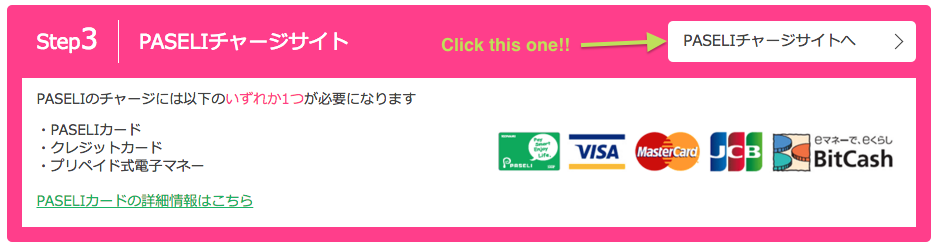
Click on the link here to access the PASELI payment page. You’ll notice a ton of Japanese here but the important thing is the button in Step 3, shown below.


Screen Shot 2015-12-10 at 5.20.38 PM.png


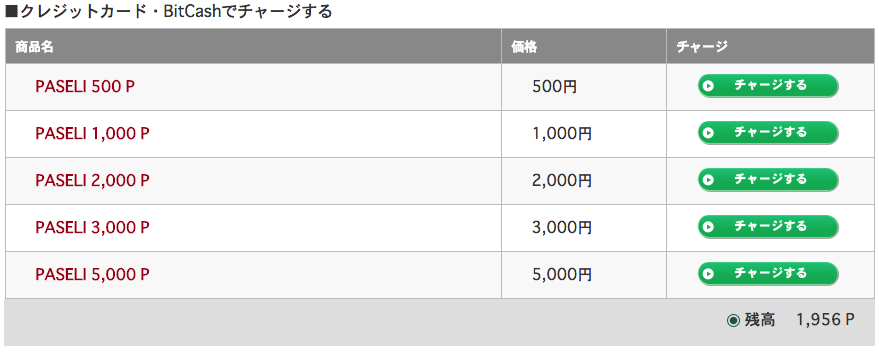
From there, you’ll be asked to log into your MyKONAMI account (and if it won’t let you log on, you’ve probably set your location to not-Japan, ya dingus). Scroll down the page you’re redirected to until you see a list of PASELI amounts.


Screen Shot 2015-12-10 at 5.24.28 PM.png
Click on however much money you’re giving to KONAMI


From there, you’ll be sent to a terms and conditions agreement. Y’all are grown enough to know you just hit the accept button.


You’ll then be asked what you’ll be using to pay for your PASELI. “Bitcash” is written in English, so it’ll be pretty easy to find.


Next, you’ll be asked to put in your Bitcash card code. Hope you know how to type in Japanese! (Or at least copy/paste the code that someone else typed for you). With that, you just keep on click and you’ll be all set!


Once you’ve added PASELI to your account, you can sign up for KONAMI’s basic subscription by going to any page that requires the service. Click here to go to Copula’s rival page, an example of a page that needs the subscription. From there you can select to pay using your PASELI, and the monthly cost of the subscription will be deducted at the 1st of each month until you run out!


Enjoy using the most of PASELI and your KONAMI Basic Subscription!


Other links:

HOW TO MAKE THE MOST OUT OF OFFICIAL e-AMUSEMENT

--


Andy Castro is a field correspondent for The (Unofficial) Round 1 Arcade Hub. A huge music game enthusiast, Andy likes to wiggy wiggy wiggy on Sound Voltex Booth but in his spare time, likes to assist newcomers and veterans alike with new rhythm game information and insights. Got questions for him? Contact him through Facebook!

Thursday, February 18, 2016

2/17 - How to Make the Most out of Official e-Amusement!

HOW TO MAKE THE MOST OUT OF OFFICIAL e-AMUSEMENT
By Andy Castro


The time has come. You’re finally going to play at an arcade that supports e-AMUSEMENT! Maybe you’re at a Round 1 in America or you’re in another country with an arcade that supports the service. Regardless, it’s time to read up on how to make the most of your experience!


1) Buying an eAMUSEMENT Pass


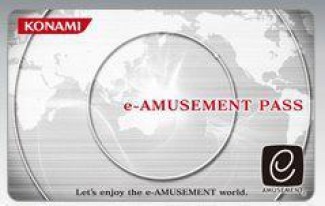
If you want to play on eAMUSEMENT, you’ll need a pass to do so. In America, Round 1 locations are typically supplied with the standard gray card (usually priced between $7 and $10)


e_amusement_disconnected.jpg


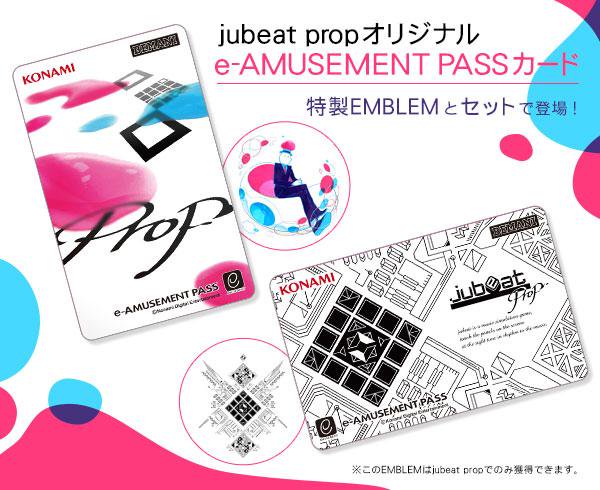
You may find that this card is totally bland and void of personality. If you do, I don’t blame you. Other card designs exist but are not sold in America, thus forcing you to search for cards using other means. I recommend searching http://auctions.yahoo.co.jp/ for any good deals!


IIDX.jpgJubeat.jpg
So many card designs!! @A@


2) Playing your first games of eAMUSEMENT


Screen Shot 2015-12-10 at 3.48.00 PM.png
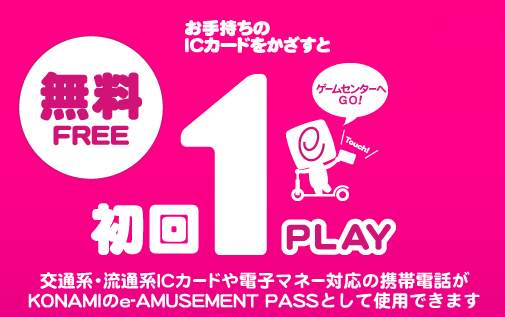
Did you know that certain KONAMI arcade games have your first game FREE?


The very first time you use your eAMUSEMENT pass on select games, you won’t have to pay for your first game! Neat, right? Put you Round 1 card away! You don’t have to worry about a thing for your first go at Sound Voltex! Just tap your eAMUSE Pass and you’re good to go!


The following games are free to play on your first game:


Screen Shot 2015-12-10 at 3.53.38 PM.png
Sorry, IIDX lovers...


For American players, this may only be two different games (possibly three if MUSECA is added to the list), but that’s valuable credits you can put into another game! Great, right? Enjoy your first game on the house, with love from Konami.


3) Registering Your eAMUSEMENT Account


Okay you’ve enjoyed your first games or so, and now you want to set up your account.
Below is a step-by-step guide on how to do such:


Screen Shot 2015-12-10 at 3.59.34 PM.png
What a beautiful site~


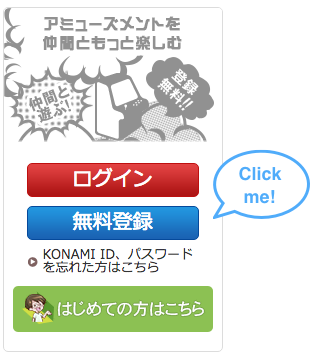
  1. Click on the blue button on the right side of the page


Screen Shot 2015-12-10 at 3.59.34 PM.png


  1. A sign up information sheet will appear. For the weeb impaired, here’s a summary of everything it’s asking:


1. Your Location - DO NOT EDIT THIS.
a. It is preset to Japan, which you WILL WANT. Trust me.


2. Your Language
a. As the person from Japan you TOTALLY ARE,
Japanese will be the only option. You get used to it eventually.


3. Your KONAMI ID Name
a. Whatever you want your username to be here


4. Your Email Address


5. Your Password
a. For your account here, not your email


6. Security Question - must be written in Japanese
a. The very first question asks for your mother’s maiden name.
b. You know what it is? 冥? It’s totally 冥. Just copy and
paste the character for Mei as your answer. Super easy to remember.


7. Would You Like News from Konami?
a. The second option is no.


8. Your Nickname (screenname)
a. Use all the English you want


9. Your Gender
a. Sorry to nonbinaries out there


10. Your Birthday


11. Blood Type
a. Not required but people like to know it I guess


12. Region in Japan you Live In
a. Just pick one


Lastly, type in the captcha and agree to the terms and conditions! You’re good to go! Check your e-mail for the confirmation and the rest should be easy to navigate on your own.


4) Adding Your eAMUSEMENT Pass To Your Profile


Log in to the website using the red button above the blue one you used to sign in. If you’re already signed in, click on the red button anyways. You’ll be redirected to your profile page!


Screen Shot 2015-12-10 at 4.22.59 PM.png
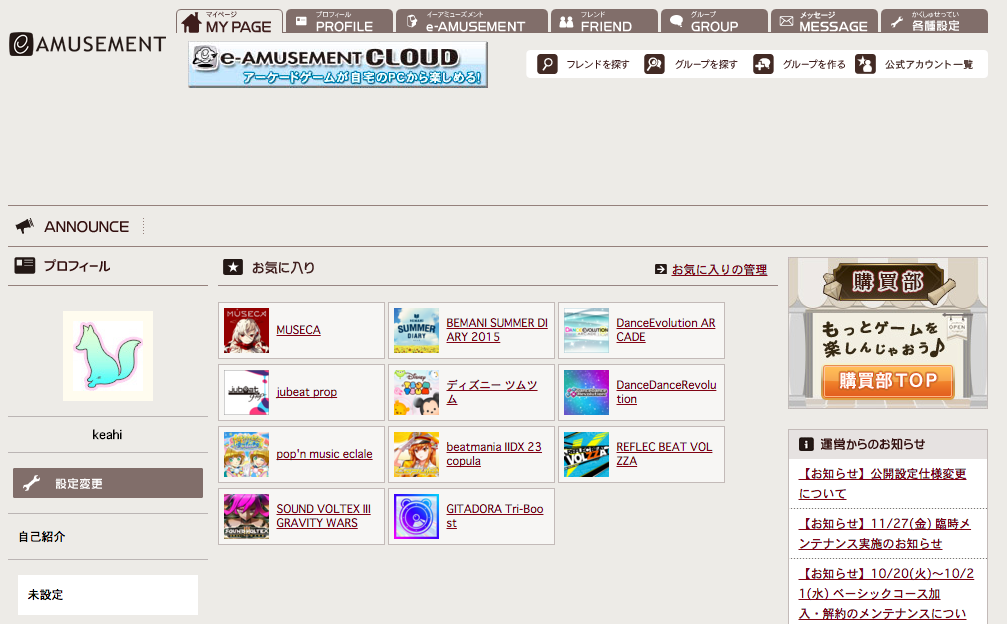
Here’s mine for reference


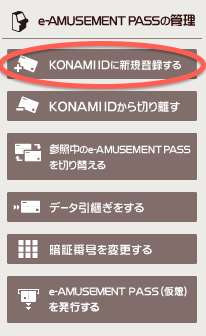
You can see there are a row of buttons at the very top of the page (with MY PAGE selected). To add your pass, you’ll want to click on the one that says e-AMUSEMENT. From there, you should see a little menu towards the left with multiple different options with pictures of cards. Simply click on the one with a “+” on a card to register your own pass.


Screen Shot 2015-12-10 at 4.25.38 PM.png


This page will ask you for the 16 digit card code on the back of your pass, as well as the 4-digit pin number you’ve been using for your games. Voila! Your pass is connected to your eAMUSEMENT profile! You’re now good to go to access your player information on the respective game webpages, add paseli, and more!


That should be all that you need to know for now! If any other questions come up, I’ll be sure to answer them ASAP! Be sure to also check out my other articles:Making the Most Out of Your Round 1” and “PASELI: Why You Want It and How to Use It” in the future! Thanks for reading!

--

Andy Castro is a field correspondent for The (Unofficial) Round 1 Arcade Hub. A huge music game enthusiast, Andy likes to wiggy wiggy wiggy on Sound Voltex Booth but in his spare time, likes to assist newcomers and veterans alike with new rhythm game information and insights. Got questions for him? Contact him through Facebook!